
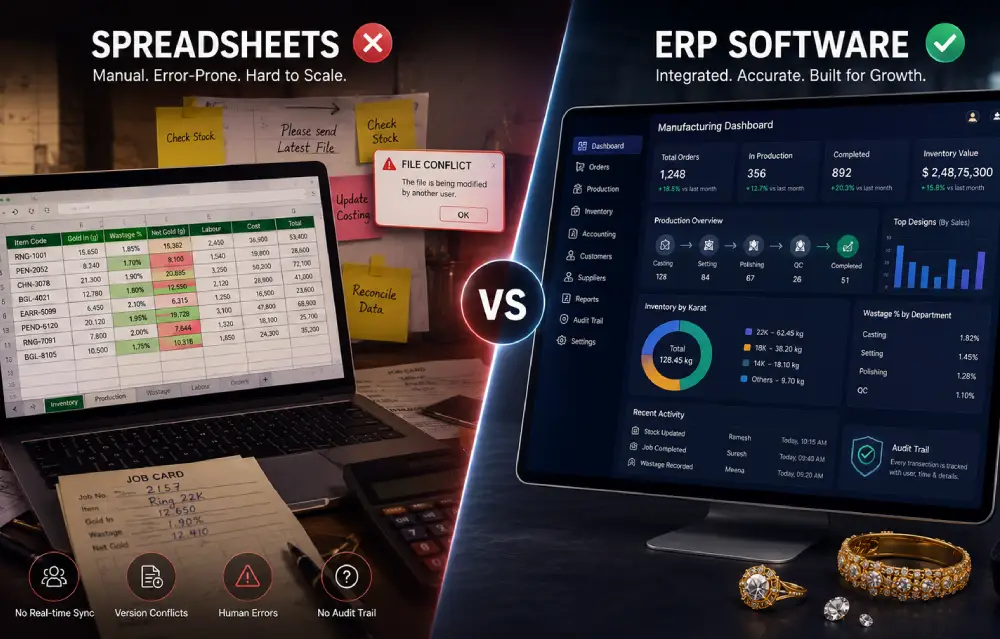
A manufacturer I spoke to a while back had a spreadsheet he was genuinely proud of. Color-coded tabs for each craftsman, formulas for wastage, a running tally of gold in and out — the kind of thing you build up over years, tweaking it whenever something didn’t quite fit. It worked well right up until the day two people had it open at once, one saved over the other’s changes, and three days of production entries just vanished. He spent that Saturday rebuilding it from memory and old job cards instead of being with his family. Nobody had done anything wrong. That’s just what happens when a business outgrows a tool that was never really built for more than one person touching it at a time.
I bring this up not to make spreadsheets sound useless, because they’re not. It’s more that this story tends to repeat itself, in slightly different forms, across enough manufacturing units that it’s worth unpacking — where spreadsheets hold up fine, where they start to crack, and what genuinely changes once a business moves to something built for the job.
Give Spreadsheets Their Due
For a small operation — one workshop, a handful of craftsmen, orders you can count on two hands in each week — a well-built spreadsheet can track inventory and costing just fine. They’re free or nearly free, everyone already knows how to use them, and you can shape them however you like without asking anyone’s permission. There’s a reason almost every manufacturer starts here. It’s not a bad decision. It’s often the right one, for a while.
The trouble isn’t the spreadsheet itself. It’s what happens as the business grows past what a single file, maintained by a single person, can reasonably hold together.
Where the Cracks Actually Show Up
Version control is usually the first thing to go. The moment more than one person needs to update stock or production numbers, you’re either emailing files back and forth like it’s 2009 or risking exactly what happened to that manufacturer — someone’s work quietly overwritten because two people had the same file open at once. There’s no real-time sync sitting underneath any of it, so whatever you’re looking at is only ever as current as whoever last hit save.
Then there’s the fact that purchasing, production, and sales tend to live in separate files, kept by separate people, on their own schedules. Nothing forces those numbers to agree with each other. They usually drift apart quietly, a little at a time, and the gap only becomes visible at month-end reconciliation — by which point untangling where it exactly started is a much harder job than it would’ve been if someone had caught it in week one.
Formulas are their own quiet risk. A dragged cell, a row deleted without checking what depended on it, a formula that didn’t copy down the way it should have — these are small, easy mistakes, and they can silently corrupt a wastage or costing calculation for weeks before the pattern becomes obvious. By the time it does, you’re not just fixing one number. You’re re-checking everything downstream of it.
There’s also just no audit trail. If a number looks off, there’s rarely a clean way to see who changed it, when, or why. For a business dealing in gold and diamonds, with hallmarking and compliance checks getting stricter every year, that’s not a minor inconvenience — it’s a real exposure.
And then there’s the simple matter of scale. A sheet that comfortably handles one workshop starts to groan the moment you add a second location, a few more craftsmen, or a genuine spike in order volume. Somewhere in there, the hours spent maintaining and cross-checking the sheet quietly cost more than the software would have.
Even something as basic as reporting stops being easy. Wanting to know your fastest-moving designs, or your average wastage by each craftsman, or true margin on a category of pieces, usually means building a new pivot table or formula from scratch, again. It’s doable. It’s just friction, every single time, and busy owners tend to eventually just stop asking the question rather than fight the spreadsheet for an answer.
What Actually Changes With a Proper System
This is where jewelry software built specifically for manufacturing starts to earn its place, and it’s a genuinely different way of working, not just a fancier spreadsheet. Instead of separate files needing manual reconciliation, inventory, production, and costing live in one connected system, updated as things happen on the floor rather than whenever someone gets around to entering them.
With a proper jewelry manufacturing workflow software setup, a job moves through casting, setting, and polishing with each stage logged as it happens, not typed into a tab later by someone hoping they remember the details correctly. That same visibility means jewelry production management software can flag a bottleneck the day it happens instead of two weeks later during a reconciliation, when the delay has already cost you.
Inventory benefits just as much. Jewelry stock management software gives you a live number for what’s on hand by karat and location, instead of trusting a count that was accurate as of last Tuesday and hoping nothing’s shifted since. And because it’s all centralized, there’s a genuine audit trail — every change tied to a specific person and a specific time, which suddenly matters a great deal the day an auditor or a hallmarking inspector wants to know how a number got to where it is.
For manufacturers specifically, jewelry software for manufacturers goes a step further, tying job work, wastage, and material costs together automatically, so the true cost of a piece becomes a number you can actually trust — not one you calculated by hand and hoped was close enough.
The Honest Trade-Off
None of this means every business needs to switch tomorrow. If you’re running a single small workshop with modest volume, a well-maintained spreadsheet might genuinely carry you fine for a while yet. The signs you’ve outgrown it tend to be pretty clear once you know what to look for: reconciliation eating more time every month, mistakes that take longer to trace than they used to, more than one person needing to touch the same numbers, or that quiet feeling of no longer fully trusting what you’re looking at.
Once those signs show up, switching usually costs a lot less than continuing to patch a system that was never built for where the business is truly now. It’s fair to be honest about what switching involves too — moving historical data over, getting a small team comfortable with a new workflow, a few weeks of adjustment. Most manufacturers find that period shorter than they braced for, mainly because a good system is built around how jewelry businesses already work rather than asking them to bend into some foreign process.
There’s also a cost on the spreadsheet side that rarely gets counted properly: the hours of whoever maintains it. That’s usually someone senior enough to be trusted with the numbers, spending real time cross-checking formulas and chasing discrepancies instead of doing the parts of their job that seriously grow the business. It doesn’t show up as a line item anywhere. It’s still real, and it tends to grow quietly, year over year, right alongside the business itself.
Where This Leaves You
A spreadsheet gets you started, and honestly, it should — there’s no reason to buy software before you need it. What it rarely does is carry a growing business through without cracks starting to show: lost data on a bad Saturday, numbers that quietly stop matching, hours spent reconciling instead of running things. A connected system built specifically for jewelry manufacturing removes most of that friction by design, rather than asking a tool that was never meant to carry this much weight to somehow hold together through sheer discipline.
Reach out to the HiraUSA team for a free demo and see what a proper jewelry manufacturing ERP exactly looks like sitting next to the spreadsheet you’re using today.


